Showing posts with label freeware. Show all posts

Monday, October 9, 2023

FREE Panoramic Software

My favorite pano generating software is now free. Sadly Kolor Software is no more, but they left a gift for their customers!


To get started with AutoPano Giga, download the latest version from this link: 

https://download.kolor.com/apg/stable/x64?src=apg/4.4.1.400

Then, you need to enter the following registration details:

User: freecopy@kolor.com

Registration code: KAPG7-K3A9X-IZJHX-FIIT7-C5IM8-MQF2N

2024 UPDATE! You can download from:

https://hdrmaps.com/blog/autopano-giga-is-now-free/

Monday, January 2, 2017

File Manager - FreeCommander XE 730 beta

When I do a fresh install of windows, there a few utilities that are on my "gotta have" list and I install right away.

FreeCommander is one of them!

I could give you a long list of reasons why I chose FreeCommander as my file manager of choice. The website has a long list of features, but I'll give you my top 5. You can explore more of the features after you download it.

1. Multi-view display
You can have single or dual windows and multiple tabs for each window. Each tab representing a folder. Quick visual access to multiple folders is what power users are looking for.


2. Customizable
With a bit of time spent, you can alter so much of the display and behavior of the program. Add your own shorcuts to programs and take advantage of parameters that FreeCommander can pass on to those programs. Very powerful option indeed!  My newest configuration is shown below.


3. Expandable
Through the use of totalcommander plugins and support for 3rd party programs, you can use FC XE to act as a smart program launcher or perform file management options that would typically require an additional program to use.

4. Current
Marek, the author of FreeCommander has been diligently doing updates. The forum is active and has users ready to help new people take full advantage of this great software. That being said, the author does listen to requests and adds features with each new release.

5. Free
That's right. FREE. But donating to the author provides with you the latest donor version which includes the latest enhancements and bug fixes.


Quick Summary

the default explorer file manager that comes with windows is fine for basic functions. But for power users, the need to have multiple windows, multiple tabs becomes something that can save you LOTS of time. Though there are other freeware file managers out there, nothing has catered to my needs as well as FreeCommander. So go download it (portable version available) and try it out for yourself. I will be posting some "how to" for using this file manager in the near future!


Sunday, November 3, 2013

Zoner 16 Free Edition

2013-11-03_01 Zoner has done some welcome interface improvements in the latest release of their image management software.
Now instead of tabs to access your favourites, folders, and catalogues; everything is accessible in a panel that can easily be toggled.
This makes the workflow more intuitive, and you can easily maximize your browsing workspace.
2013-11-03_02
2013-11-03_03 The split browser views in the pro version are now in the free version as well. It’s a nice feature to compare images in different folders.
The preview panel is gone, and now there’s a ‘preview mode’ instead. This shows the selected image and has a ribbon of images underneath. Took some getting used, to but i like it. There’s also a mapping option that will allow you to geotag images.
2013-11-03_07
Toggling folders in the browser is a nice touch also. (This is not the same as a flatview, but simply hides the subfolders in the current directory)
2013-11-03_09
2013-11-03_12 Out of all the FREE image managers out there, Zoner is by far the slickest looking. BUT..

There are still some features that are missing, and can be found in other freeware image managers.
MY WANT LIST FOR NEXT RELEASE:
1. FLAT VIEW. This is great for seeing multiple subfolders (xnview has had this option for a long time) 2013-11-03_10
2. PLUGIN SUPPORT. There’s no way to launch photoshop plugins! I have a wealth of great free plugins, and Xnview scores again by offering the option to use them. Zoner supports photoshop plugins, but only in the PRO version.  2013-11-03_11
3. TAGGING! Fastone Viewer and Xnview offer tagging checkboxes for images. it’s nice when i don’t want to use ratings for image selection. 2013-11-03_13
4. CUSTOM RENAMING. Allow to rename files on import based on tags or values. (this feature is missing in the free and pro versions). I generally like to add the date to the filename of whatever photo i take. Even if my camera numbers reset, it makes every photo filename unique. 2013-11-03_14
So is it worth the install? YES. still a great image browser, with some great features built in:
panoramic stitching
quick effects
web galleries
batch image upload feature to online services like facebook, flickr, and picassa
VIEW DOWNLOAD PAGE

Tuesday, October 15, 2013

FreeCommander

My favorite freeware file manager FreeCommander has a new public preview available. If you haven't tried a windows explorer alternative, this is a great one to try.

Donations to the author give access to the newest builds. This is an extremely powerful filemanager when you've spent some time using it. I'm now using this over xplorer2.


Friday, December 31, 2010

Free CAD

I found a decent FREE cad application for those wanting to do CAD work, but can’t or don’t want to spend money on a commercial “dwg” CAD package.
ProgeCAD 2009 is the freeware offering from www.progesoft.com
It’s an intellicad based program that offers DWG read/write capabilities. This is a powerful autoCAD clone, that can be used commercially if you purchase a license to do so. But if you are just wanting to draft up some personal projects, then you’ll find no better deal on the web than this!
12-31-584
What’s the catch? Well, it’s not the latest version of the software. And those of you spoiled by the ribbon, dynmaic UI and other goodies from AutoCAD 2009 and onwards will see that this CAD feels more like autoCAD 2000. That’s not really a bad thing.
12-31-585
The install is small in comparison. It supports reading and writing to DWG format, and you can even run lisp routines as well (something the 1200$ autoCAD LT can’t do!)
12-31-586
ProgeCAD 2009 also supports 3D. it has the basic set of 3d shapes that people using AutoCAD would be familiar with. It also supports editing of those 3D shapes with a very familiar editing toolbar.
12-31-588
It even integrates it’s own “express tools” into the program. Which basically means, all the command found under the express tools can be found in its own menu as well. It’s a nice touch for users who are familiar with AutoCAD.
12-31-589
This is good for AutoCAD users who don’t like to stray from the standard AutoCAD interface. However, I’ve never liked how AutoDesk organized their menu system.  So it would have been nice to see an intelliCAD based software break away from completely copying AutoCAD’s layout and make things more intuitive for new users.
Still for free, this is a great product. And if you want something that sports the new ribbon interface, Progesoft has recently released a 2010 version that includes that plus support for DWG 2010 format. Of course that version is not free!

Wednesday, November 3, 2010

ScriptPro 2.0 for AutoCAD

Well, i've been waiting forever on this one, and we finally have it... A new version of scriptpro is out for AutoCAD 2008 and  later..


So in addition to the cutesy ribbon interface what else is new? Well, the big thing users will notice is the option to run a script on multiple drawings without restarting CAD for every drawing. This was a BIG slow down with the older version of scriptpro. There's a "restart after X" option, so it can clear memory as it gradually gets eaten up by opening multiple drawings. So for you powerusers out there, go grab Scriptpro 2 and test it out yourself.

Wednesday, May 19, 2010

Favorite Free Photo Browser

I’m always on the lookout for good freeware tools. When I spend time reinstalling windows on someone’s computer, I like to include a variety of freeware that I find useful. Usually some sort of security/anti-virus. A zip utility, and an image browser. Because 99% of people will surf the net, get some kind of archive at some point, and will have images to view or share with others. At first, I was putting on Irfanview, then I migrated to XnView, and then to Faststone Image Viewer.

Each one of these viewers have their own benefits. And I won’t cover that in this post. Instead I’ll focus on an image browser that would be close to the image browsing capabilities of my old favorite, ACDSee. Ok, so after some surfing, I came across this:
Zoner Photo Studio Free

It’s very ACDSee-like in appearance, but offers a few features that even ACDSee lacks! Let’s get on with the mini-review!


MANAGER:

05-19-293

Well this is the Zoner’s manager interface. Zoner offers a dark theme, just like ACDSee. Tree browser and preview pane, with a task list on the right. Let’s compare this to ACDSee 12

05-19-296

As you can see the “manager” mode is very similar, and using them both, I can say that switching back and forth is very easy.

Viewer:

Each viewer mode is configurable, but you can see that once again, they are very similar.

Zoner:05-19-294

ACDSee 12:

05-19-297

EDITOR:

Let’s compare the editing windows for them.

Zoner:

05-19-295

ACDSee:

05-19-298


Some differences here, but alot of the same basic editing is available. Color, B&W, Sepia Tone, Resizing, etc.

Some really nice features are included in the free zoner software. Batch EXIF editing, keyword application and searching. Which is great for those just starting to learn to manage their photos.

Now for the bells and whistles that’s unique to Zoner.

  • Sort Photos – Read a group of photos and separate them based on Exif information (like date taken)
  • Panoramic Stitching – Stitch together photos horizontal, and vertical panos are supported
  • Create 3D images
  • Calendar Generator! Really nice feature actually

So, why free? Because Zoner offers 2 other versions of their program, a Home version and a Pro version. You can check out the comparison chart here:

Zoner Comparison Chart

I’ll do a mini-review of the pro version of zoner vs ACDSee Pro at some point. But, if you’re curious, it’s worth checking out.

Wednesday, February 3, 2010

CADGFX Update 10-02-02

Revised the menu system.. will allow users to create their own command aliases. There was a couple of conflicting commands when running the menu with Civil 3D 2009...
Still recoding some stuff, but it's taking a while.. Work is super busy!

Thursday, January 14, 2010

Free Renaming – A Second Look

Sometimes people leave things thinking that they know the limitations of it. Thinking, that because they knew it or used it, or was a part of it for so long, that they knew all about it. The fact is that people make mistakes. Sometimes, if we look again, deeper into things we once knew, we can come away with more than what we expected or hoped. This can be true in many things, including relationships, friendships, or in this case, my old renaming utility Lupas Rename!
I think it’s important to right whatever wrongs we may have caused, so today, I am writing a few corrections for users who may have put Lupas Rename “out to pasture”, so to speak.
Let’s call this a re-review! While looking a bit more in depth at LR2000’s features, I came across a couple things that proved worth sharing.
  1. LR2005 supports renaming files based on a list! Though the option was there, I somehow missed it!
To access the list feature, select the text editor button.
2010-01-14_221900
With the editor open, you can import text (file-->open) or use some of the other features to tweak your file list from the Import menu.
2010-01-14_222130
I’m just going to type my list as an example. And click the “X” button to close the window and return to the main screen.
2010-01-14_222216
Now in the main screen, we have to specify that we want to use the text in the text editor. We select The “replace text” option and RIGHT-CLICK to access a menu of available variables.
2010-01-14_222333
This context menu has lots of options, so, explore it! Really, i would like to see access to these options, a little bit more obvious. like a drop down list in the text box field or something. Because, if you don’t use a utility like this all the time, you’ll forget about this functionality.
You can see in this window, my modified list… with the <T> variable showing at the bottom.
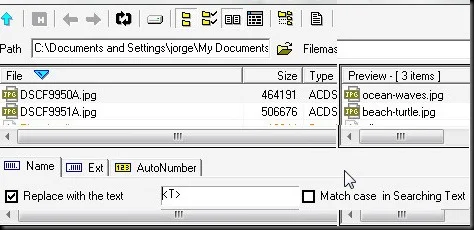
2010-01-14_222415
With the variables available, you can get really creative options going. Also, using the “flatten folders” option, allows you to work on files stored in multiple folders! (it’s the folder tree symbol left of the text editor button.)
For example, i renamed 1300 PDFs that were separated into 40 different folders with different names in each folder. Each PDF was renamed to match the folder’s name and had a sequential number after the name. Total time to do the operation, just over 1 minute!
So, go check it out, LUPAS RENAME 2000.

Tuesday, January 5, 2010

Free PDF Management


Despite the leaps and bounds DWF has made in the CAD community. I'm still seeing PDF as a popular choice for electronic file sharing. The reasons are simple. PDF has been around for ages. Non-technical people know about PDF. And many of us have to submit drawings to non-technical people for a variety of reasons. I still get questions like "What's a DWF file?" from people in the industry. So, let's face the fact that as a CAD user, you will still need to create and manage PDF files.
There are alot of PDF creation tools out there. Some of them are free. (See my earlier post for my choices for that!)

When it gets to free PDF management though, the choices dwindle considerably. But I found a great utility called PDFSAM (PDF Split And Merge). Well by the name it offers some nice options, including, Merging, splitting, rotating, reordering, etc. It requires Java to run, but I've been testing it out. It works great. Very stable, and you can use an installer version, or a zip version. That's a plus for people that have restricted rights on computers.

So for basic PDF management, it's my choice.

Monday, January 4, 2010

CADGFX 2010


Well, i've been working on releasing the CADGFX addon for AutoCAD. I will be releasing two versions. 2008 version will be for AutoCAD 2008, and CADGFX 2010 will be geared for 2010 users. So far, the beta for 2008 is about 70% complete. Updating it for 2010 will take a bit more work. I'm hoping to release the beta for 2008 by the end of the month. (fingers crossed) But here's a screenshot of the menu for 2008.


Friday, January 1, 2010

Freeware Renaming Utilities

Everyone at some point has to rename files. But if you have to rename multiple files, a renaming utility can be your best friend. I recommend two utilities.

Option 1

LUPAS RENAME 2000

Lupas Rename was one of those utilities I’ve been using for a long time. It’s small and quick and should serve the needs of most of your renaming chores.
2010-01-01_232722
The Good
  • Free
  • Windows context menu support
  • can be portable
  • easy to learn interface
  • can create bat files
The Bad
  • No longer being updated since 2005
  • Using tags for MP3 renaming is not intuitive
  • Cannot rename files based on a list

Option 2

ReNamer by Den4b

It takes a bit of time to learn the interface, but it’s probably one of the most versatile renaming utilities available.
I wanted to find a small simple utility that could rename files based on a list. This is it!
01-ReNamer
The Good
  • Free
  • Windows context menu support
  • Can be portable
  • Rename based on custom list!
  • Save and Load “presets” renaming functions
  • Powerful renaming functions using Pascal scripting
  • Still being developed
The Bad
  • Terrible name (if you don’t know Den4b!)
  • scripting is geared for programmers
  • Interface for selection/filter mode is clunky
They’re both free, and relatively small installs. I use both of these tools on a regular basis. From renaming drawings and PDF files to renaming MP3s.

Sunday, December 13, 2009

Context Menu Freeware…

The first one I use regularly is Firmtools Shellextension. It offers a thumbnail preview of many popular image formats. In addition to that, it gives the chance for quick image conversion and printing. It’s been useful for me.

FIRMTOOLS SHELLEXTENSION 2009-12-13_091131

If you want the same functionality for AutoCAD files, you download AutoCAD PVI Extension.
It’s just the thumbnail preview, no printing or any other functions, but I’m looking forward to an update to this.

AutoCAD PVI Extension 2009-12-13_091713

Third up for context menu, is a very quick and handy utility to upload images to image hosting sites: Tinypic, Imageshack, and Messyshare. With Tinypic Uploader, just right click on an image and select the service you want to upload the image to. You get a direct link you can copy to clipboard. This is excellent to share images for blogs, forums, etc. It also offers various types of screencapture with direct uploading features. Plus, you can batch upload images as well!

Tinypic Uploader 2009-12-13_092303

Monday, September 28, 2009

Blog Expansion

Over the coming weeks, I'll be expanding my blog posts to include useful freeware, (NOT just CAD or GFX related!)

Also, in a effort to get organized in a more global manner, i'll be giving updates on my experience using the GTD method. What is the GTD Method? READ ABOUT HERE

Wednesday, August 5, 2009

Share Your Photos More Deeply

I’m a bit of a panorama photo lover, but the problem with panoramas is sharing those photos with others. Small prints lose details, same as small email attachments, and many free photo sharing sites aren’t geared for panoramics. Well along comes Deep Zoom Technology from Microsoft, to the rescue!

Microsoft recently released Deep Zoom Composer. A desktop application, allowing users to create deep-zoom application that can be uploaded for website viewing. I had a chance to play with Composer, it’s interface is minimal and it’s mostly drag & drop interface allows you to build a deep zoom app pretty quickly.

deep-zoom

Check out a shining example of Deep-Zoom being used by the HARD ROCK CAFE.

So let’s say, you like Deep-Zoom, but you don’t have your own website. What can you do? Check out www.deepzoompix.com , with a Windows Live ID, you can upload your high resolution photos or panoramas and share them with the world. All the Deep-zoom work is done on the server. This is really just a technology showcase and the site says they’ll close the service at the end of 2009. So that gives you a few months to share your hi-res photos… For those interested, I’ve uploaded my own panoramas and misc photos. CHECK IT OUT!

2009-08-05_203628

Remember, you need the latest Silverlight installed to view these cool pix!

Tuesday, August 4, 2009

Free Panoramic Software – ICE

I’ll keep this post short & sweet. Microsoft has released a nice FREE piece of software for photographic users. Microsoft ICE. MS ICE is short for “Image Composite Editor”, a fancy term for photostitching software. What’s nice about this, aside from it being free, is that it offers some interesting outputs for your images. Including, the fun, Deep-Zoom. Deep-Zoom, is something similar to Zoomify, but using Microsoft’s Silverlight technology. (oh, there’s the catch!) Yes, the freebie has a catch, if you want to use some of the “cooler” features of MS ICE, you’ll be using MS technology to showcase that. You also have the option to export your panorama as an HD-View Image. Again, another Microsoft technology. I find it odd that MS is using 2 different technologies that in the end do something similar. You’ll just have to try out the technologies to see what you prefer.

Chief4