
METHOD 1... DWF
Here is a sample drawing printed using the monochrome CTB file.. My sample output file could be PDF, or DWF, or a hard copy print sent to a color printer.

I've decided to have a couple lines in color.. i dont want to modify the CTB file for printing. I'll add a couple rev clouds, but it could be any linework you want to stand out. Markup info, etc.
So i threw on a couple rev clouds on a seperate layer and then isolated the layer...


Plot it to DWF making sure you do NOT use a CTB style to print it.

now attach the DWF back into the drawing.

Doesn't look any different except for showing the frame of the DWF.

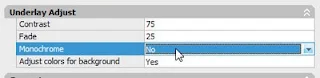
Funny thing about DWF attachments is that it bahaves alot more like an image attachment then attaching a drawing. So go to the properties of the dwf and make sure that "monochrome" is set to "NO".
now print or publish normaly. You'll see my new print has everything set to black using the monochrome CTB.

now print or publish normaly. You'll see my new print has everything set to black using the monochrome CTB.

But the DWF attached info is printing out in color!


METHOD 2... GRADIENTS!
This method is good for hatches and doesn't require plotting and attaching a DWF file. I've decided to add a red solid hatch at the bottom of the drawing.
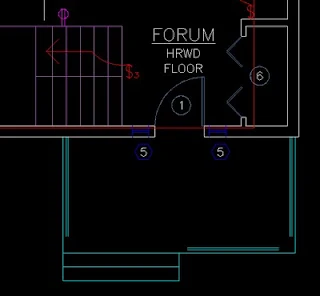
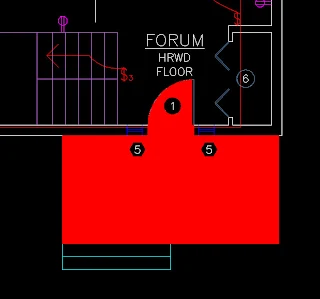
You can see the result if I just use a standard autocad layer and plot using the monochrome CTB file.
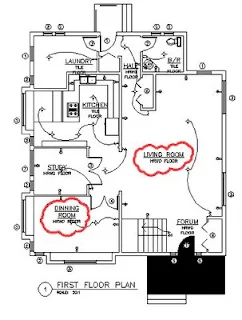
What i'll do now, is edit the hatch and use a gradient instead.
Open the hatch editor, and select gradient, 2 color mode... when picking the colors, you can either use the true color settings or even pick the same autocad index color to give it a solid color.
This method is good for hatches and doesn't require plotting and attaching a DWF file. I've decided to add a red solid hatch at the bottom of the drawing.


You can see the result if I just use a standard autocad layer and plot using the monochrome CTB file.

What i'll do now, is edit the hatch and use a gradient instead.
Open the hatch editor, and select gradient, 2 color mode... when picking the colors, you can either use the true color settings or even pick the same autocad index color to give it a solid color.

I picked color 1 (RED) for both of the colors in the gradient window.

save the changes and go plot to your monochrome CTB file. The result? Color output using the monochrome CTB, without need for adjusting pens, etc.


