Showing posts with label AutoCAD. Show all posts

Wednesday, November 3, 2010

ScriptPro 2.0 for AutoCAD

Well, i've been waiting forever on this one, and we finally have it... A new version of scriptpro is out for AutoCAD 2008 and  later..


So in addition to the cutesy ribbon interface what else is new? Well, the big thing users will notice is the option to run a script on multiple drawings without restarting CAD for every drawing. This was a BIG slow down with the older version of scriptpro. There's a "restart after X" option, so it can clear memory as it gradually gets eaten up by opening multiple drawings. So for you powerusers out there, go grab Scriptpro 2 and test it out yourself.

Wednesday, February 3, 2010

CADGFX Update 10-02-02

Revised the menu system.. will allow users to create their own command aliases. There was a couple of conflicting commands when running the menu with Civil 3D 2009...
Still recoding some stuff, but it's taking a while.. Work is super busy!

Monday, January 4, 2010

CADGFX 2010


Well, i've been working on releasing the CADGFX addon for AutoCAD. I will be releasing two versions. 2008 version will be for AutoCAD 2008, and CADGFX 2010 will be geared for 2010 users. So far, the beta for 2008 is about 70% complete. Updating it for 2010 will take a bit more work. I'm hoping to release the beta for 2008 by the end of the month. (fingers crossed) But here's a screenshot of the menu for 2008.


Monday, August 3, 2009

AutoCAD Color Tricks for B/W prints

Well, most engineering companies plot using CTB files for autoCAD. And typically companies will use a CTB file that will produce prints in black & white. But there are times when a user will want to use color. And yes, you can then create a color CTB, or modify the b/w CTB file being used. But I offer another option for those wanting to use color hatching or linework. How can i get color lines or filled hatches while using a black & white CTB?

METHOD 1... DWF

Here is a sample drawing printed using the monochrome CTB file.. My sample output file could be PDF, or DWF, or a hard copy print sent to a color printer.

I've decided to have a couple lines in color.. i dont want to modify the CTB file for printing. I'll add a couple rev clouds, but it could be any linework you want to stand out. Markup info, etc.
So i threw on a couple rev clouds on a seperate layer and then isolated the layer...

Plot it to DWF making sure you do NOT use a CTB style to print it.


now attach the DWF back into the drawing.

Doesn't look any different except for showing the frame of the DWF.


Funny thing about DWF attachments is that it bahaves alot more like an image attachment then attaching a drawing. So go to the properties of the dwf and make sure that "monochrome" is set to "NO".

now print or publish normaly. You'll see my new print has everything set to black using the monochrome CTB.


But the DWF attached info is printing out in color!


METHOD 2... GRADIENTS!

This method is good for hatches and doesn't require plotting and attaching a DWF file. I've decided to add a red solid hatch at the bottom of the drawing.

You can see the result if I just use a standard autocad layer and plot using the monochrome CTB file.

What i'll do now, is edit the hatch and use a gradient instead.

Open the hatch editor, and select gradient, 2 color mode... when picking the colors, you can either use the true color settings or even pick the same autocad index color to give it a solid color.


I picked color 1 (RED) for both of the colors in the gradient window.


save the changes and go plot to your monochrome CTB file. The result? Color output using the monochrome CTB, without need for adjusting pens, etc.


Friday, March 13, 2009

DosLib 8.0

Doslib v8.0 for AutoCAD 2007 thru 2010 is now available for download.For power users and programmers for autocad, this ARX addon provides many enhancements for programming your own routines. Very stable, very useful. Go grab it and start coding! For those of you wondering what's new in Doslib 8 since the 7.8 release...

dos_imagelist -Returns a list to all raster images in the active document.
dos_olelist - Returns a list to all linked OLE objects in the active document.
dos_plinewinding - Determines whether a closed polyline winds clockwise or counterclockwise.
dos_proxyclean - Removes all of the of proxy objects from the current drawing.
dos_proxycount - Returns the number of proxy objects in the current drawing.
dos_purgexdata - Removes all extended entity data (xdata) that is attached to an entity regardless of the APPNAME.

DOSLIB DOWNLOAD

Friday, September 26, 2008

The Road Ahead Was a Ribbon of Moonlight

A paraphrased title for today's blog entry dedicated to my elementary grade English teacher Mrs Little. She loved poetry, and she gave me a very very long lecture when I had expressed otherwise. Any ideas of where this phrase comes from?

Like Mrs Little had taught me, there's truth in poetry, it's not just about fanciful stories and ways to woo women. And the truth about the road ahead deals with a ribbon!

Windows 7, the predecessor to windows Vista, has been in development for some time. Expected to be released between the summer of 2009, and first quarter of 2010. It's a Vista that's been refined. Now I could go on about all the features and enhancements that are expected with it, but this is a graphics blog, so today I'll give you an update on MS Paint! Yes, MS Paint, which has been part of windows since version 1 is seeing a makeover in windows 7.

Paint in Windows V1

MS_Paint_in_Windows_1

Paint in windows 95

755px-Paint_95

Paint in windows 7

800px-Win7paint

Notice anything? Yes, MS Paint in windows 7 has now adopted the "ribbon" interface. This interface will show up on other applications too. Like Wordpad. The point is to show you, the current users of AutoCAD and Office, that the ribbon is here to stay. Office 2007 users have less choice of what to do with the Ribbon, yes there are third party utilities to bring back the old menu system. Autodesk was more lenient about what AutoCAD users do. You can disable the ribbon interface completely in AutoCAD 2009, but to help yourself with future upgrades of AutoCAD, learn to work with it now! You will be seeing the ribbon interface showing up in more and more programs on the road ahead. (Ooh, see how that ties into the title!?)

Thursday, September 4, 2008

AutoCAD 2009 GUI-ing Pains

If you've been using MS Office for a while and upgraded to Office 2007, you would have noticed the biggest change is the interface. The ribbon is Microsoft's answer to having access to all the tools and functions that their flagship products contain without hunting and searching through pull down menus. Many long time users of Office have complained about the ribbon. I personally found it took a bit of getting used to. But why am I writing about MS Office 2007 in a post about AutoCAD 2009?

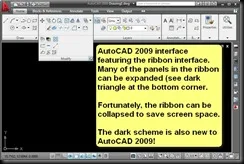
ANSWER: Welcome to the new "ribbon" interface of AutoCAD 2009!
cad2009

Apparently AutoDesk who has always been close partners with Microsoft, has decided to adopt Microsoft's interface enhancement in it's latest release.


Now for long time users of AutoCAD there will be some growing pains. But AutoDesk has made sure that the other interface tools from past releases are still there, including palettes, menus, and even the Tablet and Screen Menus are still there for anyone who uses it. (Seriously, who still uses it?)

Autodesk has done a few things better than Microsoft. The big one is that the ribbon interface is very easy to customize thanks to the CUI editor. Also, you can have different modes for the ribbon display. cad-2009-1

Simply right click on the arrow shown on the top of the ribbon to access different view modes. This is a handy way to control what panels you see and how much screen space the ribbon will take up. I personally like to have the ribbon collapse to panel titles.

After some testing 2009, I think that the new ribbon interface is a welcome addition to AutoCAD and its vertical products. Considering that Office 2007 is now a standard in Universities and colleges, users who shirk the ribbon interface should give it a try. There's no way of avoiding the ribbon! As with any new feature that AutoDesk introduces, there's a bit of a learning curve, but productivity for veteran users should be the same if not better. And this GUI change is a step in the right direction for users new to AutoCAD.

Take the time to go through the "What's New" workshop included with AutoCAD. There's many enhancements that come with 2009, including significant changes to the new DWFx file format introduced in AutoCAD 2008. Keep an eye on this blog for updated information and tips for AutoCAD 2009!

Thursday, October 25, 2007

Easy DWF sharing


Over the years, I've been patiently waiting for Autodesk to take DWF sharing to a higher level. At first, they were gearing DWF to be the PDF replacement. Now they've taken DWF to be more as part of an information/design workflow tool, and not so much as a publishing format. I have to say DWF has come a long way, but sharing DWF with those that don't have a viewer has always been a bit of pain. Yes, you could send them the link to www.autodesk.com/dwfviewer but for some reason, Autodesk insists on making a user fill out a form to download the dwfviewer. (what's the emoticon for annoyed?)

On the plus side for DWF users, Autodesk has been doing the right moves to promote the file format. First, they enhanced the viewer and made it have more features than the free PDF reader. Then they made the enhanced viewer free (Design Review 2008). Now, they give users a way to share DWF on the web to users that don't want to install the viewer. A smart move, because the need is there. Casual users don't want to download a 30MB viewer to view a 10kb file. In the past, I was looking for a way to convert DWF to SWF. Almost everybody uses flash now. But with the power of AJAX, Autodesk has a neat way to share DWF files to non-technical users. This is what autodesk's new service, FREEWHEEL, is all about. Check out the samples from AutoDesk's site.

Thursday, July 26, 2007

More than one way to make PDFs

AutoCAD 2008 finally has a PDF plotter, but for those still on older versions, what can you do? Here's my offering of PDF tools to use for AutoCAD.

1. CutePDF Writer installed with Ghostscript
This creates a PDF printer that can be used with any application, including AutoCAD. I use this, because it's free, free, free!

2. PrimoPDF installed with Ghostscript

Again, it's another front-end for Ghostscript, like CutePDF.

3. Acroplot Pro

An excellent PDF printer geared for AutoCAD printing. The printing is saved as vector information so the PDFs are small.

4. Adobe Acrobat

The most expensive option, even though they have different versions available, you'll want to spring for the Pro version if you're doing drawings. They also have a 3D version, that support 3D models from many cad applications. Very cool, and very expensive compared to our other PDF products.

Which one is better? If you want the cheapest solution and are uncomfortable with Ghostscript setup and installation, I suggest CutePDF, they have a easy version of a ghostscript install on the same page as CutePDF writer. If you want to manage, merge, split PDFs, create and control them with layer management and digital signatures, then Acrobat still reigns as the main choice.

There are free alternatives for PDF management, and I'll probably post some at a later date. But for now, this should be enough to get you going.

Tuesday, June 5, 2007

Free DWG Viewer

Yes, those in the CAD community know that Autodesk finally released a free dwg viewer a while back. It's a huge download offering "true view" technology. But what if you just want to view thumbnails, and maybe browse some dwg files before opening the behemoth DWG Viewer?

I'll refer you to a great freeware utility for CAD users called AVE (autocad version explorer). It's currently at release 1.9, and i've been using it for a while. With some coding, i've integrated into a standard autocad menu. It's a great small dwg browser. Get it here:

http://www.jmsware.com/

Check out the forums, the author is friendly and open to suggestions.